
Train your whole team on your trucks, your hydrants, your water supply
Set up an organization and build your real equipment in the simulator, then get every firefighter or student the pump reps they need without burning apparatus time. Admins review every session to see exactly where each person stands.
Built for the people who run the training
One set of organization tools, two jobs it does well: keeping a department sharp, and getting a class of students ready.
Fire departments
Keep every operator current on your own rigs and water system. The crew gets unlimited reps at the firehouse or at home, you do not burn apparatus time or fuel, and you can see who has actually been practicing before the next call tests them.
Academies and training schools
Put a whole class hands-on with realistic equipment without waiting for a truck and a yard. Students drill the same gear they will be tested on, and instructors review each student’s sessions to grade, spot the weak points, and coach.
Train on the exact gear you run
An organization owns its own equipment library. An admin builds it once, and every member trains on it. Generic simulators teach the idea of pumping. This one lets your people rehearse it on the trucks and water supply they will actually be standing in front of.
Your apparatus
Build the trucks you actually run. Set the pump, the operator panel side, every discharge and intake, tank size, and the default lines on each outlet, so the panel your people train on matches the one in the bay.
Your hydrants
Add the hydrants in your district with their real static and residual numbers. Members practice building a supply from the same water system they will be pumping on a call.
Your static sources
Define the ponds, tanks, and drafting sites your crews draft from, with the lift and supply characteristics that make drafting from them realistic.
Your direct pumping/nurse units
Set up the tenders and direct pumping/nurse units that feed your operation, so members can rehearse a sustained supply from a shuttle the way your department actually moves water.
Your line configurations
Save the preconnects and hose layouts your department carries: diameter, length, and nozzle. Members pull the same lines off the bed that they would on the rig.
Your foam equipment
Add the in-line eductors and foam concentrates your department carries. Members run full foam evolutions, from setting the metering dial to flushing the eductor, without burning a drop of real concentrate.
Assign the training, then watch it get done
Hand your roster the JPRs, drills, and pump hours you need completed, with a due date. Members get an email with a link to start, and completion is tracked from the work they actually do on the panel.
JPRs, drills, or pump hours
Assign NFPA 1002 JPR check-offs from the built-in catalog, a single Pump Ops Skills drill, or a target number of hours on the pump. Every assignment has a start date and a due date, and you can backdate the start so recent work counts.
The whole roster, or just a few
Send an assignment to everyone, to everyone except a few people, or only to the members you pick. Someone who joins next month is automatically included in anything assigned to everyone.
Notified by email, tracked automatically
Each member gets an email when training is assigned, with a link to start. Nothing is checked off by hand: a passed JPR, a passed drill, or hours logged on the panel inside the window marks it done, and late completions are flagged.
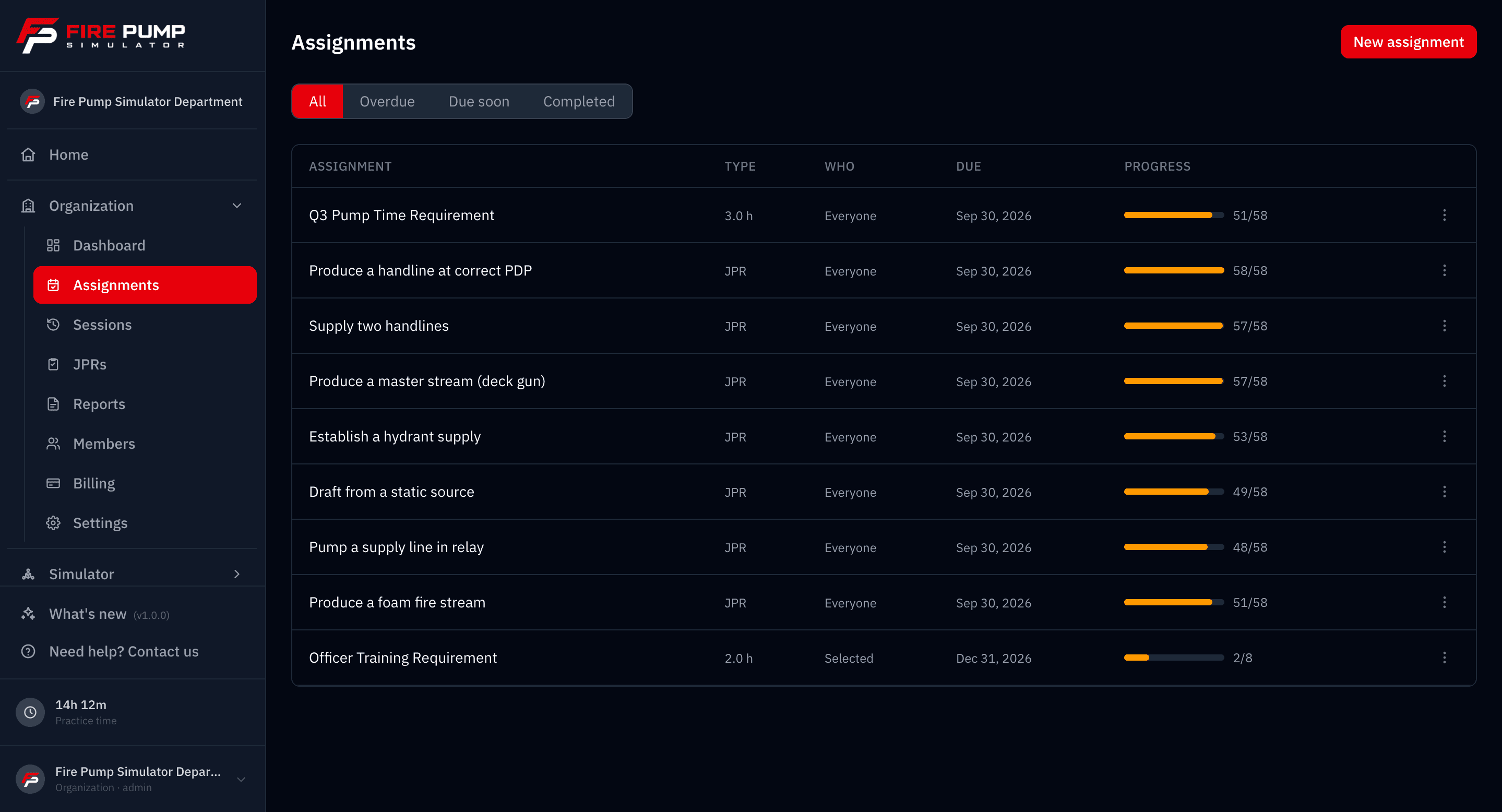
Assignments are an organization admin feature on an active plan. Overdue work shows up in the needs-attention view on your dashboard, and members can turn assignment emails off from their account page.
See every rep, assess and assist
Reps only build skill if someone is checking the work. Admins get a window into every member’s training, down to the individual action on the panel.
Every session, every member
Admins see all of the org’s training sessions in one place and can filter down to a single firefighter or student to see exactly what they have been working on.
Event-level review
Open any session for a timestamped, event-by-event timeline with the KPIs and pressure charts from that run. See where pressure changed, what the operator did, and how long each action took.
Roster dashboard
A department dashboard rolls up total sessions, completion rate, training hours per day, and JPR pass rate by NFPA competency, with a needs-attention view that flags overdue assignments and members who have stopped training.
Coach live, while the pump is running
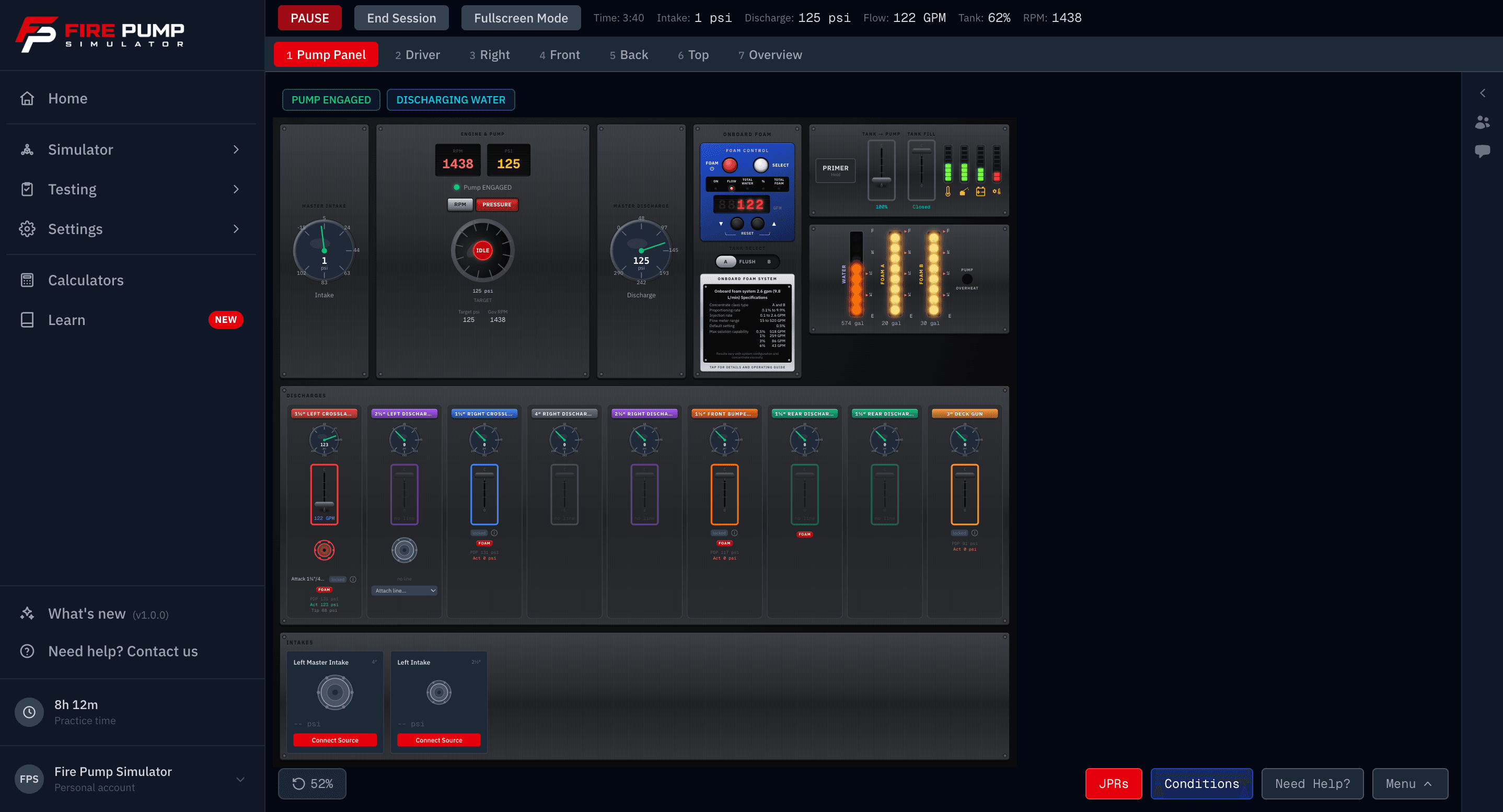
Session review tells you what happened. Live sessions let you be there while it happens. One member runs the pump and shares a join code, and the instructor and the rest of the class watch the same panel in real time from their own screens. The drill that used to mean crowding a whole class around one truck now works from the classroom, the station, or home.
Watch the run as it happens
Every gauge, valve, and scene on the trainee’s panel, live on each viewer’s own screen. Viewers join with an 8-character code in seconds, from any device with a browser. No projector, no crowding around one laptop.
Throw faults mid-evolution
The host can hand fault control to the instructor, or to any viewer. Fail the hydrant, burst a line, or kill the prime while the trainee works the problem. Every fault is attributed by name in the session log, so the debrief shows exactly what was thrown and when.
Talk it through in chat
A built-in session chat keeps coaching in the moment, right next to the panel. The host can mute individual viewers or silence chat entirely during graded runs. The whole run still lands in session review for the debrief afterward.
Live sessions are included for organization members, and they pair with session review: coach in the moment, then replay the recording step by step in the debrief.
Turn every rep into a training record
The reps your people put in are also documentation. Completed sessions roll up into NFPA 1002 driver/operator training hours you can hand to your ISO reviewer, so the pump time your crew logs in the simulator counts toward the records your department has to keep anyway.
Hours logged automatically
Every completed session becomes a training record. Hours come from real active time on the panel with idle time stripped out, so there is no logbook to keep and no minutes to tally by hand.
Categorized for ISO and NFPA 1002
Each record is tagged to its NFPA 1002 §5.2 objective and the ISO PPC Driver/Operator category, and every member’s hours are tracked against the 12 hour per year continuing-education benchmark.
Export to the systems you use
Download CSV formatted for Vector / TargetSolutions, ESO, and Firehouse, or a print and save-as-PDF report you can retain for ISO/FSRS. Pick any date range and attest it with your training officer’s name.
- Per-member hours tracked against the 12 hour/year NFPA 1002 benchmark
- Detailed activity log: date, member, apparatus, NFPA reference, and outcome
- Custom date ranges for annual or quarterly ISO reporting
- Pass/fail grading you can include or leave off
- A printable report attested and signed by your training officer
- CSV layouts for Vector/TargetSolutions, ESO, and Firehouse
Reporting is an organization admin feature on an active plan. Vendor CSV layouts are provided as a convenience, verify the columns against your account. Fire Pump Simulator is an independent product and is not endorsed by or affiliated with NFPA, ISO, or Verisk.
Make the math match your area
Friction loss is where pump operators live and die, and not every department uses the same coefficients. An admin can set your organization’s hose friction-loss coefficients for each hose size, and every member’s simulation uses your numbers.
The values lock in the moment a sim starts, so a later change never alters a run already underway. Pump discharge pressure works out the way it does on your hose, so the reps your people put in carry straight over to the panel.
- Set coefficients per hose size for your organization
- Every member’s sim uses your numbers, not generic defaults
- Values are locked in when a sim starts
- Consistent pump discharge pressure math across the whole roster
Bring your people on, manage who does what
Invite your roster by email and decide who builds the equipment and who trains on it. As people come and go, you stay in control of the organization.
Email invites
Invite firefighters or students by email. Each person gets a link to join your organization and start training.
Admin and member roles
Admins build equipment, set coefficients, and review sessions. Members train on what you have built. Promote or change roles as your team needs.
Enable or disable members
Turn access on for new recruits and a new class, and off for people who move on, so your roster always reflects who is actually training.
How it works
From a new organization to a reviewed roster.
- 01
Create your organization
Start an organization, name your department or academy, and kick off your free trial. You become the owner and first admin.
- 02
Build your equipment and invite your people
Add your apparatus, hydrants, static sources, direct pumping/nurse units, and line configurations, set your friction-loss coefficients, then invite firefighters or students by email.
- 03
Assign training and track completion
Assign NFPA 1002 JPR check-offs, Pump Ops Skills drills, or training-hour targets with due dates. Members get an email with a link to start, and completion is tracked automatically from their activity. You see who is done, in progress, or overdue, and review every session event by event.
Scales from a single station to a full academy
Whether you are bringing on one crew or a whole class, there is a plan sized for your roster. Start your organization free, build your equipment, and bring your people on before you commit. Not sure where you land? Talk to us and we will help you size it.
Frequently asked questions
Can I add my department’s actual trucks, hydrants, and water sources?
Can I see how my firefighters or students are doing?
Can I assign training and see who has finished it?
Can an instructor watch a trainee run the pump live?
Can I match the friction-loss numbers we use locally?
How do I add my people?
Is this for fire departments or for training schools?
Does it run in the browser, or is there something to install?
How do plans work for an organization?
Can I use this to document training hours for ISO or NFPA?
What formats can I export training records in?
Is this affiliated with NFPA or IFSTA?
Get your team training on your equipment
Create your organization, build your rigs and water supply, and bring your people on. You will be reviewing their first sessions before the week is out.